Desk, Room & Resource Booking System

Transform how you book and manage spaces

WiggleDesk helps you connect and coordinate seamlessly, no matter how your teams work. Whether you're remote, hybrid or site-based, it brings structure to collaboration, boosts efficiency and enhances the workplace experience.

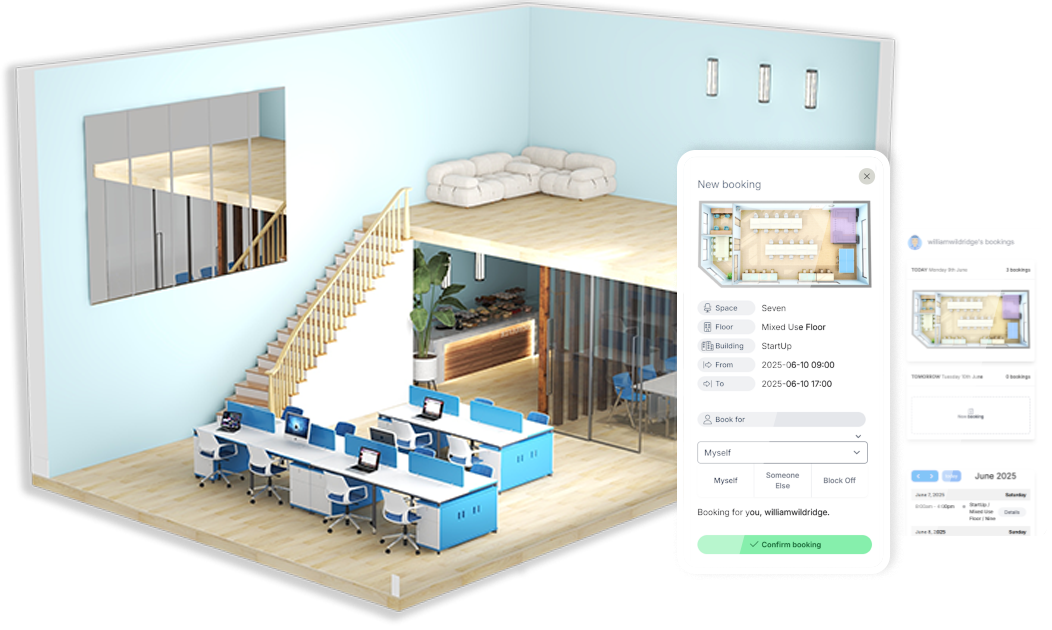
room and desk bookings visualisation of a 3D room and mobile devices showing the booking system on the screen

Desk and room booking software for hybrid working and smarter space use

Manage resources and space smarter

Easily book and manage desks, meeting rooms, parking, lockers and more all in one place.

Bookings backed by data

Collect data and gain insights into your assets and rooms so you can make informed decisions.

Maximise space value

Turn underused or vacant areas into revenue to boost your estate's value and improve returns.

Visualise your space interactively

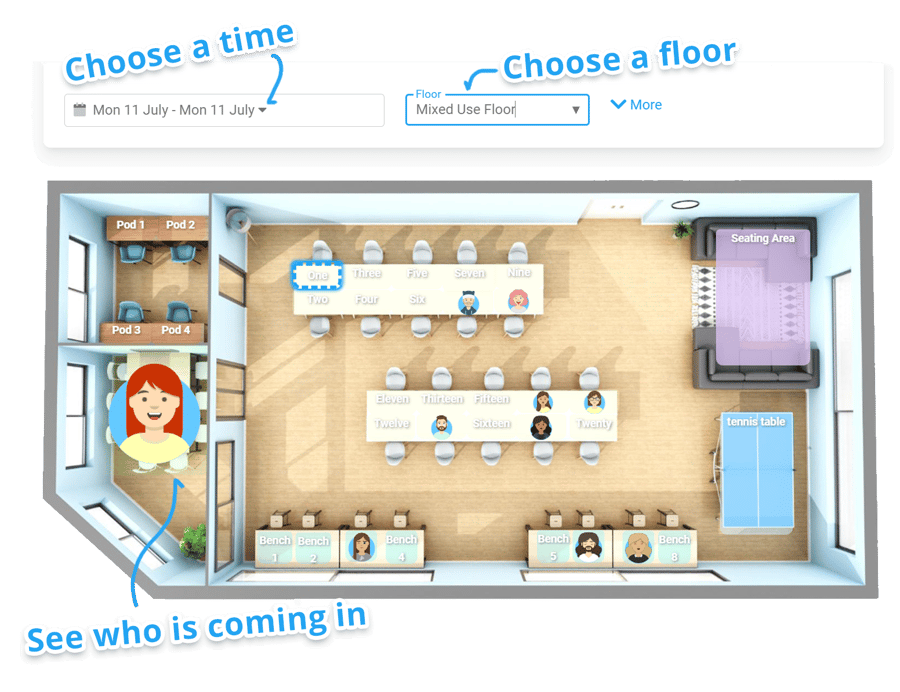
Plan your spaces with your own floorplans or let WiggleDesk create beautiful, interactive layouts to manage your estate more effectively.

Your teams have been absolutely brilliant and have made the switch possible, working with our techies and speaking in a language beyond me.

Steve Sproat
WiggleDesk site booking screen

Hybrid working, made easy with simplified desk and space booking

Empower your teams to efficiently book desks, meeting rooms and shared resources in advance or on arrival with WiggleDesk, our one-click desk booking software for smooth, visible, and flexible hybrid working.

For busy offices, walk-up bookings and QR code check-in help keep availability accurate, reduce double-booking, and stop “ghost” bookings from blocking space.

  • Book in advance or on arrival using a fast, self-serve desk and room booking experience

  • See who's coming in and where your team is sitting, so collaboration is easier to plan

  • Keep bookings accurate with check-in prompts and auto-cancellation of no-shows

  • Fit your organisation with controls for floors, zones and capacity

Space utilisation that you can prove with occupancy heatmaps and analytics

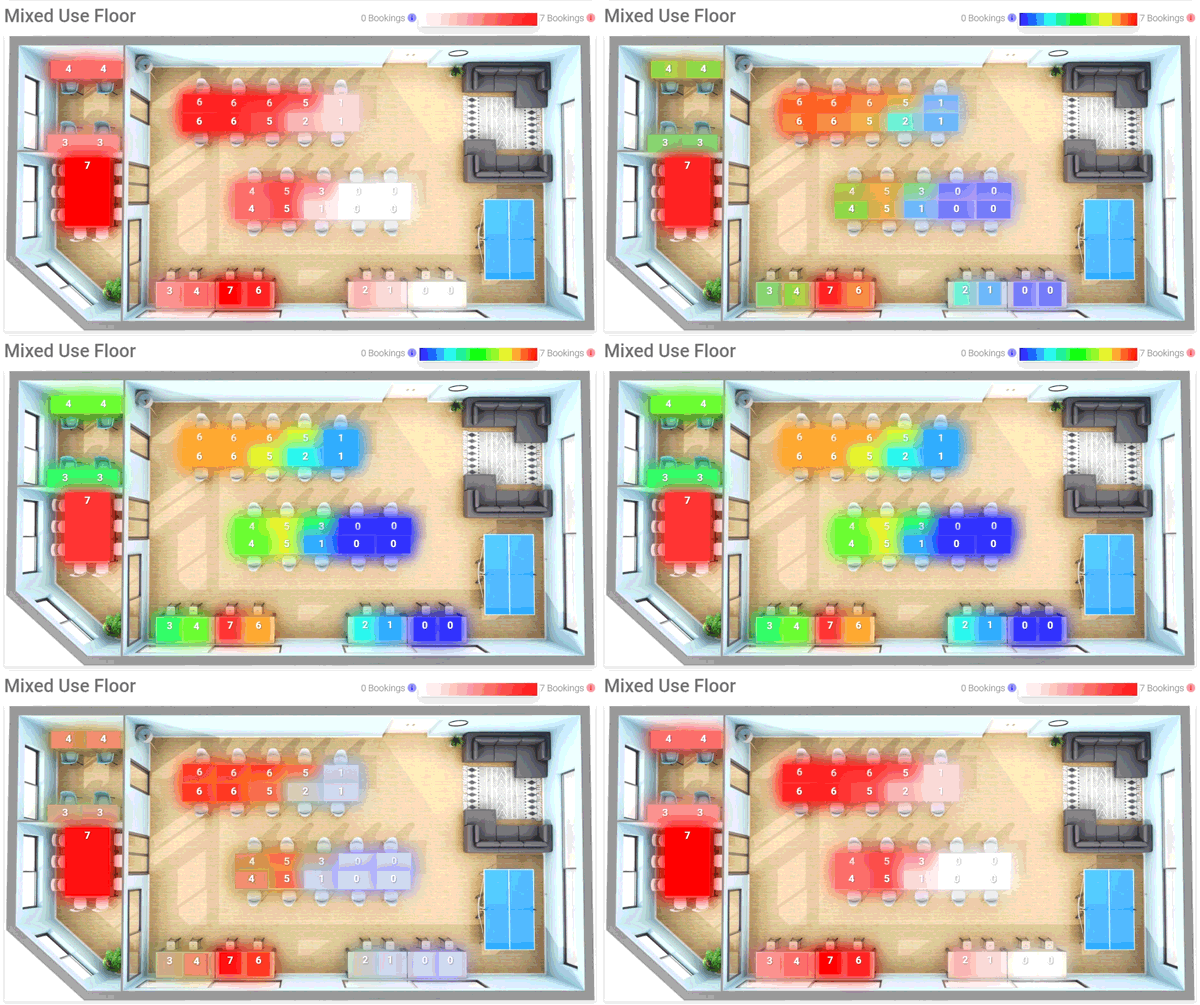
WiggleDesk turns booking activity into space utilisation analytics that highlight what's busy, what's underused and where capacity is being wasted. 

Visual occupancy heatmaps and real-time dashboards enable informed decisions on consolidation, expansion, reconfiguration and hybrid working policies - all backed by accurate data you can share confidently.

  • Utilisation reporting by space, floor, site and team.

  • Booking behaviour insights.

  • Reports for stakeholders, workplace strategy and continuous improvements.


WiggleDesk reporting animation
WiggleDesk_Car_parking_2

Streamline your resource booking beyond desks

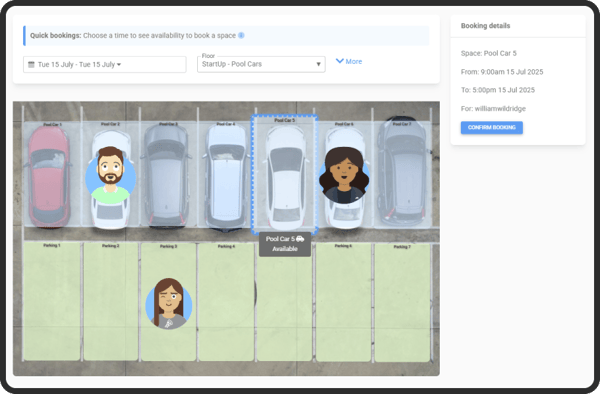
Manage resource booking alongside desk and room booking, so everything people rely on is visible, controlled and easy to access. Whether resources are bookable by the hour or allocated longer-term, you can reduce admin, avoid clashes and keep a single view of who has what across your estate.

  • Make more resources bookable including parking, lockers, storage, equipment and accommodation

  • Use flexible booking rules such as hourly slots, daily booking, recurring patterns or longer-term assignment

  • Keep control with visibility across sites, floors and teams so resources are used fairly and efficiently

  • Support shared and personal resources without spreadsheets or manual chasing

Streamlining space and resource management on an enterprise-level

Desks are only part of the story. Transform your resource management and optimise space utilisation with ease.

Desk and meeting room booking, made simple

Let people book desks, meeting rooms and shared spaces in seconds with clear real-time availability, rules and limits that fit hybrid working.

Interactive floor plans people actually use

Make it easy to find the right space fast with visual desk and room booking on floor plans, across buildings, floors and zones.

QR check-in and no-show release

Keep availability accurate with contactless check-in and automatic no-show handling, so desks and rooms don't sit blocked when nobody turns up.

Space utilisation and occupancy analytics

Turn bookings into actionable insight with dashboards and utilisation reporting, so you can understand demand, reduce waste and plan space with evidence.

Start the conversation

Get started today. Schedule a 20 minute discovery call and follow it with a personalised demo designed for your team.

Module features

Interactive floorplan booking

Advanced search and filter tools - Branded booking experience - Customisable floorplan layouts - Drag-and-drop booking - Instant booking confirmation - Mobile-optimised interface - Multi-site and multi-floor support - Real-time availability - Supports desk, room, and parking bookings - Zone and capacity management

QR code booking & contactless check-in

Auto-cancellation of no-shows - Check-in reminders - Contactless and COVID-safe - Desk-level data capture - No app required - Real-time status tracking - Secure QR authentication - Supports visitors and contractors - Unique QR codes per desk or room - Walk-up booking support.

Real-time occupancy insights

Anonymised privacy options - Booking behaviour analysis - Capacity monitoring - Custom report filters - Data to inform strategic decisions - Exportable occupancy reports - Heatmaps & trend visualisations - Integration with IoT sensors - Live usage dashboards - Team-based usage insights.

Read our latest Spotlights

Get expert insights, stay up to date with the latest proptech trends, and explore real-world customer success stories.

Changing software providers
Perth and kinross
customer story

Perth and Kinross Council

Concerto was implemented to enable a centralised, lifecycle-based approach to property asset management through a unified asset management database.

IT change risks

Frequently asked questions

What is Concerto, and how does it differ from other IWMS/CAFM platforms?

Concerto is an all-in-one platform for managing property, facilities and assets. It brings everything into one place. From maintenance and compliance tracking to room bookings and project planning. Whether you're responsible for a single building or a nationwide estate, Concerto helps you stay organised, efficient and informed. It’s web-based, works on mobile and is built to support day-to-day tasks as well as long-term strategic decisions. You’ll get real-time insight into your assets and operations, so you can respond quickly, plan ahead and stay compliant.

What is Concerto, and how does it differ from other IWMS/CAFM platforms?

Concerto is a fully integrated platform that combines a range of powerful tools to eliminate the need for multiple systems or complicated workarounds. Its modular design lets you start with the features you need now and easily expand as your organisation grows. Whether you are tracking maintenance requests or managing capital projects, everything is connected within one system, providing a clear and comprehensive overview at every level.

What makes Concerto stand out is its smart asset tracking, which uses barcodes and scheduled servicing to monitor and verify assets. It offers strong project and budget control tools to plan and deliver projects efficiently, including cost tracking, resource planning, and live reporting. The platform also includes user-friendly room and desk booking features to optimise space usage. Maintenance is streamlined through a helpdesk that logs and tracks issues, sending automatic alerts to keep everyone informed. Concerto supports compliance by managing inspections, certifications, and regulatory tasks all in one place. Finally, it provides clear insights through dashboards and tailored reports that help guide decisions and improve performance.

Trusted by a wide range of public and private sector clients, from local councils and NHS trusts to major retailers, banks, and universities, Concerto is mobile-friendly, highly configurable, and supported by Bellrock's extensive expertise in property and compliance management.

Can Concerto assist with space planning?

Yes, intelligently and dynamically. Concerto’s space planning tools help you visualise, allocate and optimise every square meter of your estate from desks and rooms to full buildings. Whether you’re managing hybrid workspaces, university campuses or local authority properties, Concerto ensures your space strategy is data-driven, not guesswork.

Can Concerto assist with space planning?

Concerto offers powerful interactive floorplans that support importing layouts from AutoCAD (DWG/DXF) or PDFs. These floorplans feature clickable zones for desks, rooms, and departments, allowing you to overlay important data such as usage, booking status, or compliance information. You can map assets, emergency exits, sensors, and maintenance zones, providing a rich visual context for managing your space.

The system uses a structured space hierarchy organised by Region, Site, Building, Floor, Room, and Desk. Spaces can be tagged by use, such as office, lab, meeting room, or breakout area and allocated to specific departments or user groups. This organisation supports chargeback processes, auditing, and future space planning.

Concerto integrates desk and room booking functionality, allowing users to reserve hot desks or meeting rooms with the option for recurring bookings by team or function. QR-code check-ins and usage tracking help prevent double-booking and reduce space hoarding, improving overall efficiency.

Occupancy and utilisation analytics pull data from IoT sensors, access control systems, or Wi-Fi enabled devices. This insight enables identification of underused, peak, or vacant areas, helping forecast capacity needs for hybrid working models or future growth. It supports estate consolidation and right-sizing decisions with accurate, data-driven evidence.

Financial impact is another key feature: Concerto calculates cost per square metre by team, floor, or function and highlights vacant space as a potential financial loss or opportunity. Integration with finance systems enables comprehensive reporting and budgeting, facilitating discussions around space value and return on investment.

Finally, Concerto helps maintain compliance and safety by mapping health and safety elements such as fire routes, extinguishers, and signage. It monitors cleaning schedules, inspections, and occupancy limits, flagging overdue checks or non-compliant rooms to ensure legal and regulatory alignment across your entire estate.

How user-friendly is Concerto for non-technical staff?

Concerto is designed for everyone from helpdesk teams and contractors to site managers and senior execs. You don’t need to be technical to log a job, check compliance or track project updates. The system is clean, intuitive and role-based, so users only see what they need. Whether you're on a mobile, tablet or desktop, it’s straightforward to use: no coding, no jargon and no guesswork. Concerto is also aligned to ensure compliance with WCAG 2.2 accessibility standards. Please contact our support team should you require a VPAT.

How user-friendly is Concerto for non-technical staff?

Concerto combines powerful tools with a clean, intuitive interface so teams can focus on their work rather than wrestling with software. The platform offers easy navigation with large icons, clear menus, and logical grouping of tasks by job, site, or asset. Its responsive design works seamlessly across desktop, tablet, and mobile devices, adapting to how users prefer to work.

The experience is tailored to each user role. Helpdesk staff can log and assign jobs with just a few clicks, engineers can update tasks on-site by attaching photos or notes, contractors access a simple self-service portal with no software installation required, and executives can view high-level KPIs without being overwhelmed by task lists. Mobile-friendly features let users log issues, scan QR codes on assets, complete checklists, and review job histories while on the move, if you can use a smartphone, you can use Concerto.

Visual tracking tools include dashboards with colour-coded job statuses, drag-and-drop scheduling, and interactive maps and floorplans, making it easy to see progress at a glance. The helpdesk benefits from quick job logging, bulk uploads, smart search, and live contractor updates, all designed to require little or no training for everyday use. Contractor access is straightforward, allowing secure job viewing, document uploads, and quick marking of work as complete, including RAMS, certificates, and photos.

Built-in help features such as hover tips, icons, and step-by-step wizards guide users through tasks, supported by a searchable help centre and role-specific guides. Onboarding is rapid, with options for onsite or remote training, user-friendly guides and videos, and a “train the trainer” approach ideal for larger teams.

Accessibility is a key focus, with high-contrast modes, scalable text, keyboard navigation, and the ability to customise terminology (like using “Location” instead of “Site”) to fit organisational language. Concerto evolves continuously based on real user feedback; friction points are logged and resolved, ensuring usability improves with every release.


Let's start the conversation

concerto-shape-dark-2