This guide compares six CAFM and facilities systems by how they work with the AI assistants organisations already use: Microsoft Copilot, ChatGPT and Claude. They are Concerto, Facilio, IBM Maximo, Eptura, Planon and MRI Evolution. Three connect to an assistant you choose through MCP, one runs inside Microsoft Teams and Copilot, and two keep their AI inside their own product.
Most estates teams already have an approved AI assistant. The question is whether it can see the estate: open jobs, overdue PPM, certificates and leases. This guide looks at how each system answers that, what the assistant is allowed to do, and how far each feature has got.
On this page
Key takeaways
- Concerto, Facilio and IBM Maximo publish a way to connect an AI assistant you choose to your data, through MCP.
- They handle changes differently. Concerto's connection is read-only. Facilio's can update records, with confirmation for deletions and mass updates. IBM flags each tool as read-only or destructive.
- Eptura's assistant runs inside Microsoft Teams and Microsoft 365 Copilot, without needing Copilot licences.
- Planon and MRI build AI into their own products and publish no route for Copilot, ChatGPT or Claude to read their data.
- Most of this is new. Concerto's connector is in private beta, Facilio's in early access and Eptura's assistant in preview.
What makes a CAFM system AI-ready?
An AI-ready CAFM system lets people ask questions of their estate data in plain English, and get answers they can check. There are three ways vendors do it today.
| Route | How it works | In this guide |
|---|---|---|
| A connector to your own assistant | The CAFM system publishes an MCP connector. Staff use Claude, ChatGPT or Copilot as they do now, and the assistant reads from the CAFM system when it needs to | Concerto, Facilio, IBM Maximo |
| An assistant inside Microsoft 365 | The vendor's assistant is installed in Teams and Microsoft 365 Copilot, and handles requests for that vendor's products | Eptura |
| AI built into the product | An assistant inside the CAFM system's own screens, such as helpdesk triage or ticket creation | Planon, MRI Evolution |
What is MCP?
MCP (Model Context Protocol) is an open standard for connecting AI assistants to business systems. Anthropic introduced it in 2024, and assistants including Claude, ChatGPT and Microsoft Copilot can now use MCP connectors. A CAFM system with an MCP connector can answer questions from whichever of those assistants an organisation has approved.
What estates teams ask
- Which statutory tasks are overdue, and at which sites?
- Which certificates expire in the next 30 days?
- Which quotes are waiting for approval, and for how much?
- Which lease deadlines fall this quarter?
- Which contractors are missing their SLAs this month?
How we compared these systems
We asked five questions of each system. They are the questions IT and information governance teams ask before they approve any AI connection.
- Which assistants does it work with? We looked for Copilot, ChatGPT and Claude named on the vendor's own pages.
- How does it connect? We checked for an MCP connector, a Microsoft 365 agent or a built-in assistant.
- Can the assistant change records? We checked whether access is read-only, or how writes and deletions are confirmed.
- Who can see what? We looked at sign-in, user permissions and audit logs.
- Is it released, and where does the data live? We recorded each vendor's stated release stage and hosting region.
Facts about each system come from the vendor's own website, documentation and newsroom, read in November 2026. AI features are changing quickly, so we review this guide every three months. If something has changed, tell us and we will correct it.
AI-ready CAFM software compared
Scroll the table sideways to see every column.
| System | Best for | AI route | Assistants named | Read or write | Sign-in and permissions | Release stage |
|---|---|---|---|---|---|---|
| Concerto | UK estates that want answers in the assistant staff already use | MCP connector (Ask Concerto) | Claude, ChatGPT, Microsoft Copilot | Read-only | Named users through Microsoft Entra ID | Private beta |
| Facilio | Facilio customers that want an assistant to update records | Hosted MCP connector | Claude, ChatGPT, Microsoft Copilot, Cursor | Read and write, with confirmation | Single sign-on; each user's own permissions | Early access |
| IBM Maximo | Maximo customers building their own AI agents | MCP server in the customer's own cluster | None named | Per tool: read-only or destructive | API key or user token | Ships with Maximo 9.2 (June 2026) |
| Eptura | Microsoft 365 workplaces booking desks and visitors | Assistant in Teams and Microsoft 365 Copilot | Microsoft Copilot | Bookings and visits; asset lookups only | Users act within the products they can access | Preview |
| Planon | Large organisations that want AI inside their IWMS | Built-in Planon Assistant | None | Creates tickets | Not stated | Released (built-in assistant) |
| MRI Evolution | Owners and occupiers that want one vendor's AI | Built-in Agora Assistant | None | Automates helpdesk tasks | Role-level permissions, full audit trail | Released (Agora) |
Read on each vendor's website and documentation in November 2026.
The 6 AI-ready CAFM systems for Copilot, ChatGPT and Claude
1. Concerto concerto.co.uk
Best for: UK estates that want staff to ask Claude, ChatGPT or Microsoft Copilot about live estate data, read-only and signed in through Microsoft Entra ID.
At a glance
- Made by
- Bellrock Technologies, part of the Bellrock Group since 2016
- Head office
- Liverpool Science Park
- AI route
- Ask Concerto, an MCP connector between the assistant you already use and your Concerto data
- Assistants
- Claude, ChatGPT and Microsoft Copilot. Each user picks the approved assistant they already work in
- What it can see
- 162 read-only views across 12 product areas, from sites and buildings to documents and operational records
- Read or write
- Read-only. It can look up and combine data, but can't create, edit or delete records
- Sign-in
- Named users sign in with their work Microsoft account through Microsoft Entra ID, approved by the organisation
- Where the AI runs
- In the organisation's own assistant, under its existing agreement with that provider. Concerto doesn't run the AI model
- Release stage
- Private beta with Concerto customers, ahead of general release
- Hosting and security
- Microsoft Azure, UK data centres; ISO 27001, Cyber Essentials, NHS Data Security and Protection Toolkit
- Pricing
- Part of Concerto. Depends on the Concerto agreement and the number of named users
Concerto is a CAFM and IWMS platform built in the UK since 2004, managing over 450 customer estates. Ask Concerto connects its data to the AI assistant an organisation has already approved, so there is no new AI system to buy, host or secure.
The assistant answers from Concerto's live records: jobs, PPM, compliance, assets, documents and leases. Because the connection is read-only, it can combine data from across the estate in one answer without being able to change anything.
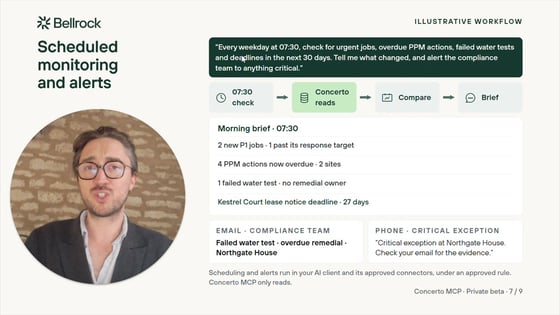
Your identity provider stays in control. Users sign in with their work Microsoft account through Microsoft Entra ID. Only named users the organisation approves can connect.
The AI stays where you approved it. Questions are answered in the organisation's own assistant, under the agreement it already has with that provider. Concerto supplies read-only data and doesn't run a model of its own.
One answer across the estate. Because Concerto holds maintenance, compliance, property and projects on one platform, one question can draw on all of them: an overdue water test, the asset behind it and the lease it sits under.
What it does well.
- Works with the assistant staff already use: Claude, ChatGPT or Microsoft Copilot.
- Read-only access, signed in through Microsoft Entra ID, with named users only.
- Answers draw on maintenance, compliance, property and projects together.
- UK-hosted, with no separate AI product to procure.
What to weigh.
- It is in private beta with Concerto customers ahead of general release.
- It is read-only, so the assistant can't raise jobs or update records.
2. Facilio facilio.com
Best for: Facilio customers that want an AI assistant to read and update CMMS records, with confirmation for anything destructive.
At a glance
- Made by
- Facilio Inc., founded in 2017
- Head office
- New York, USA, with a UK office in Sittingbourne, Kent
- AI route
- Facilio MCP, a hosted connector, plus Facilio's own AI agents and Helpdesk AI
- Assistants
- Claude, ChatGPT, Microsoft Copilot and Cursor (MCP page)
- What it can see
- Work orders, service requests, assets, tenants, purchase orders, inventory and custom modules
- Read or write
- Read and write. Deletions, overrides and mass updates are shown to the user to confirm first
- Sign-in
- Single sign-on through OAuth2. The assistant sees no more than the signed-in user can. Queries are logged in Facilio's audit trail
- Release stage
- Early access, open to all Facilio CMMS customers
- Hosting
- Hosted in the customer's region, including the UK
- Pricing
- No new AI seats to buy, per Facilio
Facilio is a New York company that describes itself as an AI platform for facilities management. Its MCP connector lets Claude, ChatGPT, Copilot or Cursor work with Facilio data, and Facilio published a setup guide for Claude and ChatGPT in October 2026.
It goes further than reading. The assistant can draft and make changes, such as updating work orders, while Facilio holds back deletions, overrides and mass updates for the user to confirm.
What it does well.
- Works with Claude, ChatGPT, Copilot and Cursor through one hosted connector.
- The assistant can update records, with confirmation for destructive actions.
- Each user's own permissions apply, every query is logged, and data stays in the customer's region.
What to weigh.
- The connector is in early access, and only Facilio CMMS customers can use it.
- Some of Facilio's own AI features, such as Compliance AI and Reporting AI, are marked "Upcoming".
3. IBM Maximo ibm.com
Best for: asset-intensive enterprises already on IBM Maximo that want to connect AI agents they build or choose.
At a glance
- Made by
- IBM
- Head office
- Armonk, New York, USA, with a UK head office at Hursley
- AI route
- The Maximo MCP server, plus the built-in Maximo Assistant
- Assistants
- IBM names none. Its documentation refers to "external AI agents"
- What it can see
- Maximo Manage data and functions exposed as tools, such as changing a work order's status, creating follow-up work or a service request
- Read or write
- Each tool is flagged read-only or destructive. Destructive tools ask the user for approval
- Sign-in
- An API key for integrations, or a user token for multi-user use
- Release stage
- Ships with Maximo Application Suite 9.2, released in June 2026
- Hosting
- Runs in the customer's own Red Hat OpenShift cluster
IBM Maximo is IBM's asset management suite. Version 9.2, released in June 2026, added an MCP server so organisations can bring their own AI agents to Maximo, alongside an upgraded Maximo Assistant that can carry out multi-step tasks.
The server runs inside the customer's own OpenShift cluster and exposes Maximo Manage functions as tools. Administrators decide which tools to publish and mark each one as read-only or destructive.
What it does well.
- Open to any MCP-capable agent, with tools the organisation defines.
- Read-only and destructive flags on every tool, with approval for destructive ones.
- Runs in the customer's own environment.
What to weigh.
- It needs OpenShift and Maximo administration to set up, and IBM names no assistant it has tested.
- It is built on Maximo Manage. IBM's documentation doesn't say it covers Maximo Real Estate and Facilities.
4. Eptura eptura.com
Best for: Microsoft 365 workplaces that want desk bookings, visitors and asset look-ups handled in Teams and Copilot.
At a glance
- Made by
- Eptura, which also owns Archibus
- Head office
- Atlanta, USA, with an EMEA head office in London
- AI route
- Eptura Assistant, "powered by Microsoft Copilot", installed in Microsoft Teams and Microsoft 365 Copilot
- Products covered
- Eptura Engage (bookings), Eptura Visitor and Eptura Asset (look-ups only). Archibus has its own AI features
- Read or write
- Creates, changes and cancels bookings and visits. Deletions and cancellations need a confirming reply
- Permissions
- Users can only act in the Eptura products they have access to
- Licences
- An Eptura AI licence and a Microsoft 365 licence. A Microsoft 365 Copilot licence is not required
- Release stage
- Preview, through a beta programme
Eptura is a workplace and asset software group based in Atlanta, and the owner of Archibus. Its assistant meets staff where many already work, in Teams and Microsoft 365 Copilot, and handles bookings, visits and asset look-ups through one conversation.
Archibus customers get separate AI features inside Archibus, including an assistant for data analysis and AI summaries of work requests.
What it does well.
- Runs in Teams and Microsoft 365 Copilot, where Microsoft workplaces already are.
- No Microsoft 365 Copilot licence needed.
- Confirmation before deletions and cancellations.
What to weigh.
- It is in preview, and it doesn't cover Archibus.
- On the asset side it only looks things up, and Eptura documents no connection for ChatGPT or Claude.
5. Planon planonsoftware.com
Best for: large organisations that want AI built into their IWMS, with desk and room bookings in Outlook and Teams.
At a glance
- Made by
- Planon, 80% owned by Schneider Electric
- Head office
- Nijmegen, the Netherlands, with a UK office in Brighton
- AI route
- The built-in Planon Assistant, which creates tickets from natural language
- Microsoft 365
- Microsoft Places integration: desk and room bookings in the Outlook and Teams calendar, available since June 2026. It handles bookings and doesn't connect an AI assistant to Planon data
- Assistants
- None named on Planon's public pages
- Security model for AI
- Not stated
Planon is a Dutch IWMS vendor founded in 1982 and now 80% owned by Schneider Electric. Its AI sits inside the platform: the Planon Assistant listens to a request and creates the ticket, and Planon describes contract summarisation and smart triage among its built-in features.
Its Microsoft Places integration, released in June 2026, puts Planon desk and room bookings into the Outlook and Teams calendar.
What it does well.
- AI built into the IWMS, from ticket creation to triage.
- Desk and room bookings in Outlook and Teams through Microsoft Places.
- One platform across real estate, workplace, maintenance and sustainability.
What to weigh.
- Planon publishes no route for Copilot, ChatGPT or Claude to read Planon data.
- It doesn't state a security model for its AI features on its public pages.
6. MRI Evolution mrisoftware.com
Best for: property owners and occupiers that want one vendor's AI across leasing, finance and facilities.
At a glance
- Made by
- MRI Software. The product was called Concept Evolution until 2022
- Head office
- Solon, Ohio, USA, with UK offices in London and Sleaford
- AI route
- The built-in MRI Agora Assistant in Evolution version 7, described as an intelligent helpdesk; MRI's wider Agora AI for real estate
- Assistants
- None named
- Permissions and audit
- Agora outputs respect role-level permissions, and every agent action is logged and traceable
- Release stage
- Agora Intelligence and Agora Orchestrator available since June 2026, for MRI's real estate sectors
MRI Evolution is the CAFM product of MRI Software, a property software group based in Ohio. Evolution version 7 includes the MRI Agora Assistant, which automates everyday helpdesk tasks, and connects to MRI's Agora Insights.
MRI's wider Agora AI, launched in June 2026 and expanded in November, runs agent workflows with human approval and a full audit trail. Its new Agora Voice logs maintenance calls into the facilities system to raise a work order.
What it does well.
- AI built into the helpdesk, inside Evolution.
- Role-level permissions and a full audit trail of agent actions.
- One vendor's AI across leasing, finance and facilities for MRI customers.
What to weigh.
- MRI publishes no route for Copilot, ChatGPT or Claude to read Evolution data.
- Its Agora announcements centre on real estate, and they don't say which features reach Evolution.
How to choose AI-ready CAFM software
AI demos are easy to stage. These checks show what will happen with your data and your people.
- Start from your approved assistant. Ask your IT team which assistant is approved. Then ask each vendor to demo with that one, on its own account.
- Ask what the assistant can change. Read-only, write with confirmation, or write freely. Match it to how far your governance team will go today.
- Check sign-in and permissions. Ask how users sign in, whether each user's own permissions apply, and who approves access.
- Ask where the AI runs. Check whether questions are answered in your own assistant, under your agreement with that provider, or by a model the vendor runs.
- Ask a real question. In the demo, ask about overdue statutory tasks at one site, or certificates expiring next month. Check the answer against the system.
- Check the audit trail. Ask where each AI query and action is logged, and who can see the log.
- Ask for the release stage in writing. Beta, early access, preview or general release, with dates.
- Check the data underneath. An assistant only answers as well as the records behind it. Ask how much of your estate (maintenance, compliance, leases, projects) sits in the system it reads.
What we could not verify
- Release dates. None of Concerto, Facilio or Eptura gives a date for general release of its AI connection.
- Facilio's stage. Facilio's MCP page says early access, while its AI assistants page calls the connector live. That page also names Gemini, which the MCP page doesn't.
- IBM's tested assistants. IBM's documentation names no AI assistant, and doesn't say whether the MCP server covers Maximo Real Estate and Facilities.
- MRI and MCP. Industry press reported MRI discussing MCP at its October 2026 conference, but MRI's own pages don't describe it.
- Planon's plans. Planon publishes no external-assistant route on its public pages.
Final thoughts
AI in CAFM is moving from built-in chat towards connecting the assistant an organisation already trusts. The useful questions are which assistant, what it can change, and whose permissions apply.
For UK estates that want staff to ask Claude, ChatGPT or Microsoft Copilot about live estate data, read-only and signed in through Microsoft Entra ID, Concerto is a strong place to start. Its answers can draw on maintenance, compliance, property and projects together.
Other needs point elsewhere. Facilio customers that want an assistant to update records can join Facilio's early access. Maximo customers building their own agents can use IBM's MCP server.
Microsoft 365 workplaces focused on bookings can trial Eptura's assistant. Organisations that prefer AI inside the product can look at Planon and MRI Evolution.
Frequently asked questions
Can I connect ChatGPT, Claude or Microsoft Copilot to my CAFM system?
Only if your CAFM vendor provides a connection. Concerto, Facilio and IBM Maximo publish MCP connections, and Eptura's assistant runs inside Microsoft 365 Copilot. Check which assistants each vendor names, and whether the connection is released or still in beta.
What is MCP?
MCP (Model Context Protocol) is an open standard for connecting AI assistants to business systems. Anthropic introduced it in 2024. A CAFM system with an MCP connector can answer questions from whichever supported assistant an organisation has approved.
Is it safe to connect an AI assistant to our estates data?
It depends on the controls. Look for sign-in through your identity provider, each user's own permissions, an audit log and clear limits on what the assistant can change. Ask Concerto is read-only, and named users sign in through Microsoft Entra ID.
Can the AI assistant change records in the CAFM system?
That varies. Ask Concerto can't create, edit or delete records. Facilio's connector can update records and asks the user to confirm deletions and mass updates. IBM Maximo flags each tool as read-only or destructive.
Where does the AI run, and what happens to our data?
With a connector, the question is answered in your own assistant, under your organisation's agreement with that provider. The CAFM system supplies the data. With a built-in assistant, the vendor runs the AI inside its product, so ask which model it uses and where.
Which CAFM software works with Microsoft Copilot?
Of the six here, Concerto and Facilio name Microsoft Copilot as a supported assistant, and Eptura's assistant runs inside Microsoft 365 Copilot and Teams. Eptura says a Microsoft 365 Copilot licence is not required for its assistant.
What can estates teams ask an AI assistant connected to CAFM?
Questions that would otherwise need an export and an afternoon. For example: which statutory tasks are overdue at which sites, which certificates expire next month, which quotes are waiting for approval, or which lease deadlines fall this quarter.
Is Ask Concerto available now?
Ask Concerto is in private beta with Concerto customers ahead of general release. A Concerto demo shows it running on example estate data.